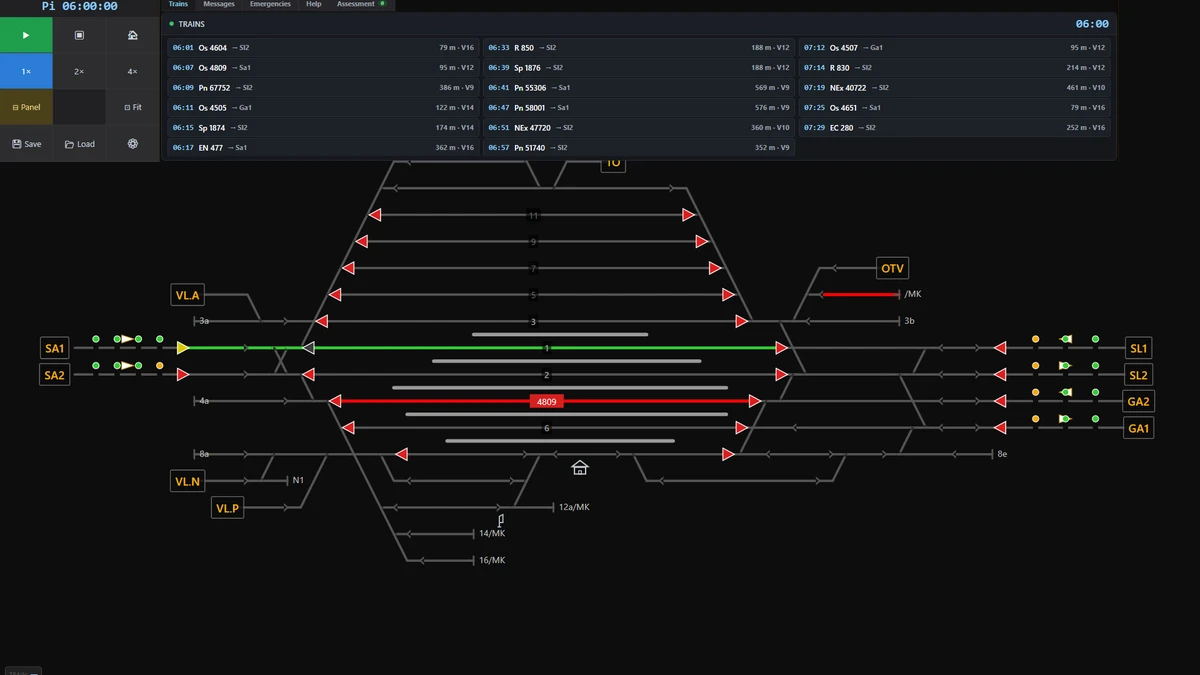
Use the train board to decide what each train needs next: confirm its booked track, watch the departure-colour warning, inspect the train with F2, and set the correct route before the row reaches the yellow departure stage. A green track badge means the train is on its booked track; a red badge means it is standing somewhere else and counts as a mistake. Keep passenger trains on a platform, route freight to its exit signal, and deal with shunting or overnight movements before they obstruct scheduled traffic.
Read the train board
Each row gives the train's relevant time, number, destination, booked track, and length. For a train entering your area, the time is its arrival at the edge of the area. For a train that begins at the station, it is the scheduled departure time. A turnaround can show two numbers, such as Os 4300 / Os 2503, because the same set arrives under one number and leaves under another.
| Track badge | Meaning |
|---|---|
| Grey-blue | The timetable has booked the track, but the train has not arrived there. |
| Green | The train is standing on its booked track. |
| Red | The train is on a different track and the placement is assessed as a mistake. |
Use row colours to time your route
For a train waiting to depart, the row colour indicates how soon you must prepare its departure route:
- Red: more than three minutes remain.
- Blue: two to three minutes remain.
- Grey: one to two minutes remain.
- Yellow: one minute or less remains; set the departure route.
A flashing row indicates a train asking to enter. Grey rows represent shunting movements, so do not treat them as ordinary departures. Press Ctrl+B to switch between the next 90 minutes and the operational board. Press Ctrl+I to add live speed and position information.
Find out why a train is waiting
Point at a train before choosing the next action. Use F1 for its timetable, including stations, arrival and departure times, and tracks. Use F2 for the set's type, length, speed, waiting reason, signal ahead, and the train number it will continue as. Use F3 to view station and track lists.
- Departure time: the train waits until the timetable permits departure.
- A route: set the required departure route.
- Brake test: allow three minutes after vehicles are attached.
- Technical inspection: allow one minute per wagon.
- Driver change: allow 20 minutes.
- Locomotive run-round: arrange the required shunting routes.
Keep trains on suitable tracks
A passenger train must stop at its platform with the whole train alongside it. A freight train stops in front of the exit signal, and the precise stopping position on its booked track is not assessed in the same way. The booked track still matters: routing a train onto another track causes a mistake, while a booked track farther ahead makes the train wait until the route is completed.
If a passenger train is sent through a track without a platform, it stops at the exit signal and the game reports the mistake. Open-line halts are served only by trains that list those halts in their timetable.
Manage turnarounds and overnight sets
A multiple unit or push-pull set that turns around normally changes ends where it stands. A locomotive-hauled set needs its locomotive to run round. If the next working is more than 60 minutes away, the game asks you roughly 10 minutes after arrival to stable the set. Move it to a non-platform track, the depot, or the scenario's specified overnight track using a shunting route. A movement without a signal may require shunting on order.
Before the morning departure, bring the set back to a platform. It becomes a train again 30 minutes before departure. Leaving a set at a platform for 30 minutes after arrival costs five points, so clear long layovers rather than letting them block passenger facilities.
Protect the score while operating
The assessment counts delay gained inside your area, not the entire delay with which a train entered. A train entering 10 minutes late and leaving 12 minutes late has gained two minutes in your area. Delay tolerance is normally five minutes, but it is three minutes in Switzerland, six in Germany, and one in Japan. The first five minutes after starting are not counted as gained delay.
Higher-category trains are especially costly to delay. Give express and international services precedence where possible, and avoid cancelling a route in front of an approaching train. Departures without line consent, skipped call-on steps, and emergency controls left active also create penalties. Use a call-on signal only when there is no practical alternative. Press G to open the train graph, which compares timetable lines with actual running and shows the current time, helping you coordinate board decisions across the line.