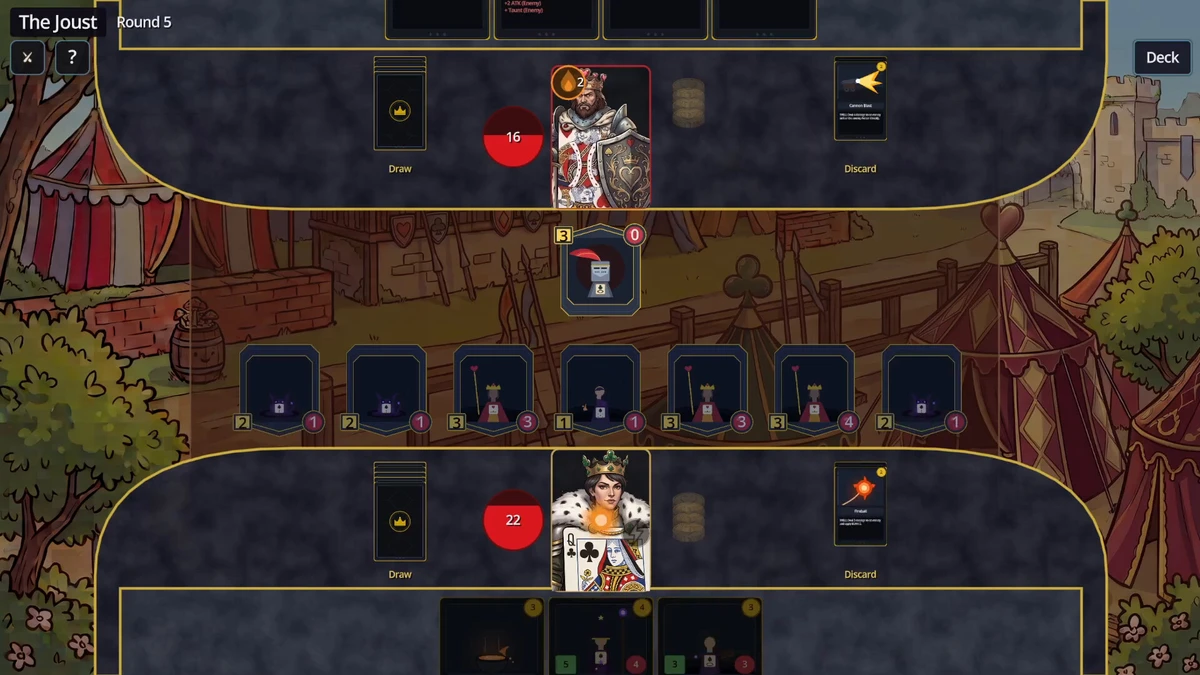
To control a battle in Card Monarchy, select a card or ready unit, then follow the highlighted spaces or targets and the instruction at the top of the screen. Spend gold to play cards or activate your Hero Power, attack when your units are available, and choose End Turn when you are finished. The keyword guide below explains the effects shown on cards.
Battlefield layout
- Your Monarch appears at the bottom and the opposing Monarch at the top; the red value beside each portrait is that Monarch's health.
- The central board provides five unit positions for each side.
- Your cards are displayed along the bottom. Cards whose costs exceed your available gold appear dimmed.
- The coin beside your Monarch shows the gold available during the current turn.
- Use
Deckto inspect the deck in play. The?button, orF1, opens battle help. - Each player has a draw pile and discard pile. Once a draw pile is empty, its discard pile is shuffled and used again.
Turn controls and resources
- At the beginning of your turn, you gain gold and draw three cards.
- Your hand can hold no more than seven cards.
- You begin with 1 gold. The amount rises by 1 each turn until it reaches 4.
- Unused gold disappears at the end of the turn rather than carrying forward.
- Play cards and make attacks in any order, provided you have the required gold and available units. Finish with
End Turn.
Playing cards
Units
- Select the unit in your hand.
- Choose one of the empty positions on your side that is glowing gold.
- Use the right mouse button to cancel the current selection.
A unit normally cannot attack on the same turn it enters play. CHARGE removes that restriction.
Spells
Select the spell, then use the highlighted target or location indicated by the on-screen prompt. Depending on the spell, this may be a unit, a side of the board, or a Monarch portrait. Spells without a target take effect immediately.
Making attacks
- Choose one of your units that is able to attack.
- Select an enemy position that is glowing as a legal target.
- Right-click if you need to cancel.
- When units fight, both deal their damage simultaneously.
- A unit is removed when its health reaches 0.
- Your units can attack the opposing Monarch directly. Monarchs do not retaliate against attacks.
SHIELDabsorbs damage before health is reduced.- An enemy with
TAUNTmust be handled before the protected units can be selected.
Hero Power
Click your Monarch portrait to activate its Hero Power. It costs 1 gold and is limited to one use per turn. If the power requires a target, select one of the targets highlighted by the game.
Inspecting cards
- Hover over a card in your hand to view an enlarged version.
- Press and hold the right mouse button over a board unit to display its complete card.
Keyboard shortcuts
| Input | Function |
|---|---|
1 through 7 | Chooses the card in the matching hand position, counting from the left. |
Q W E R T | Chooses your five board positions from left to right. |
A S D F G | Chooses the opponent's five board positions from left to right. |
` | Activates the Hero Power. |
Hold Alt | Displays the shortcut labels on screen. |
Shortcuts can be changed in the Pause Menu under Keybind Options. A changed key still performs the action associated with its corresponding control.
Winning and losing
You win by reducing the opposing Monarch to 0 health. If your Monarch reaches 0, the current run ends. A victory returns you to the map, and your remaining health carries into later battles unless the game restores some of it.
Card keyword guide
Triggers and card removal
| Keyword | Effect |
|---|---|
BATTLE CRY | Activates an effect when the card is played. |
LAST WISH | Activates an effect when that unit is killed. |
VENGEANCE | Activates an effect when a friendly unit is killed. |
EXHAUST | Removes the card from the game after it is played, so that copy will not return to the draw pile. |
Attack and protection keywords
| Keyword | Effect |
|---|---|
CHARGE | Allows the unit to attack on the turn it is played. |
CANNOT ATTACK | Prevents the unit from attacking. |
TAUNT | While present, prevents friendly units without Taunt from being attacked. |
DEFEND | Intercepts damage aimed at an adjacent unit. |
RETALIATE N | Deals N damage to the unit that attacks it. |
RESISTANT | Reduces damage from spells by half. |
STEADFAST | Reduces melee damage by half, with a minimum of 1 damage taken. |
STEALTH | Hides the unit from targeting and attacks. It ends when the unit attacks or is damaged by an area effect. |
STEALTHY | Begins with Stealth and restores it whenever the unit's attack kills another unit. |
SABOTEUR | Destroys an opposing Taunt unit when played. It has no effect if the opponent has no Taunt unit. |
Recovery and additional units
| Keyword | Effect |
|---|---|
REJUVENATE N | Restores N health to itself at the start of every turn. |
LIFESTEAL | Restores health equal to the damage this unit deals, up to its maximum health. |
REPLICATE | Creates a copy of itself after surviving damage. |
REGAL N | Creates N 1/1 Peasants at the start of the player's turn. |
Damage-over-time effects
A unit can carry only one of BURN, ACID, and BLEED at once. Applying another effect replaces the one already there.
| Keyword | Effect |
|---|---|
BURN N | The Spades effect. At the start of the affected unit's turn, it takes damage equal to its Burn stacks. Burn does not naturally decrease. |
ACID N | The Diamonds effect. The unit takes N damage at the start of its turn, after which the Acid value decreases by 1 each turn until it is gone. |
BLEED N | The Clubs effect. It deals damage like Acid and loses 1 stack each turn. While any Bleed remains, the unit also has 1 less Attack. |
CURE | The Hearts effect. Removes Burn, Acid, and Bleed from the target and restores the Attack lost to Bleed. It does not remove Curse cards. |